Notarized by Apple

Restore old memories
and make new ones.

Crisp restores and upscales video on-device — then lets you actually edit it. A real timeline, auto-montage cut to the beat, and a generative restore lane. No cloud. No account. No subscription.

Free to use · 78 MB · macOS 12 or later · Apple Silicon

100% offline Nothing uploaded No account One-time $129
SourceCrisp Max

Real 1950s newsreel — Amos Alonzo Stagg’s 95th birthday — run through Max, the generative restore, on-device. Drag the handle. Max is the slow lane by design: this restore ran at about 26 seconds a frame. Against a plain resize to the same size it holds 1.23× the fine detail; the harder 1936 clip further down manages 1.50×. Both, measured →

21

tools, one window — restore, edit,
montage, convert

16

video & photo formats in,
ProRes / H.265 / AV1 out

16×

upscale, and a generative
restore lane past that

0

bytes uploaded — every frame
stays on your Mac

What it does

The whole restore pipeline,
in one drop.

Most tools give you a single stage. Crisp runs the lot — denoise, low-light lift, restore, upscale — then hands you an editor for what comes next.

Upscaleto 4K, 2–16× Restoregenerative Max lane Montagecut to the beat Timelinea real editor Split screen2 or 4 up Reframevertical, square Trimstart and end Speedfaster or slower Gradelook and colour Stabilizeshake removal Rotateand flip Cropratio or zoom Bordercolour and size Overlaywatermark or logo Captionburned in Fadein, out, both Looprepeat a clip Reversebackwards Audioextract, mute, gain Compresssmaller files Convertmp4, mov, mkv, gif
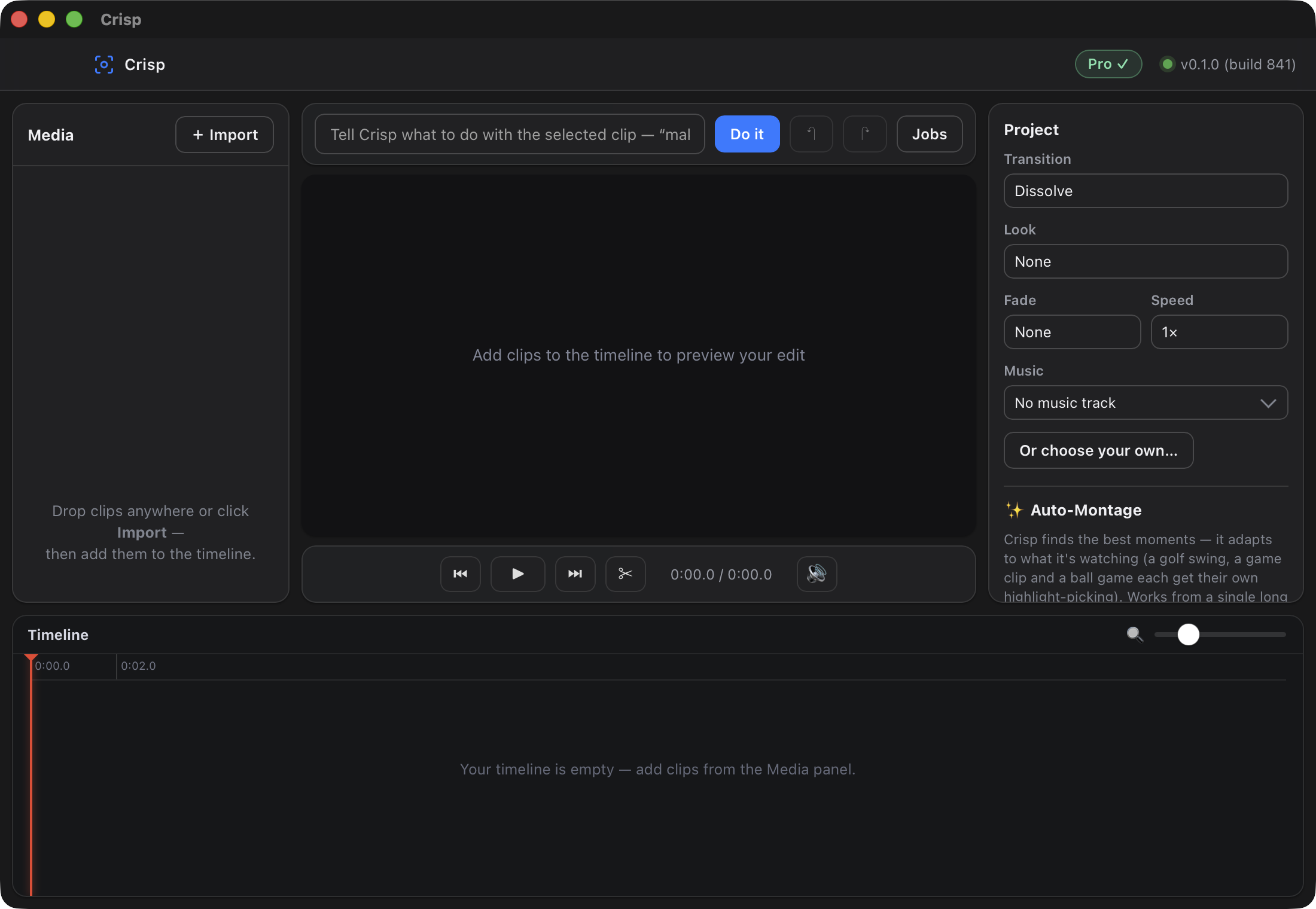
Crisp on macOS: media panel, preview, project settings and timeline.
Crisp on macOS — editor, queue and upscaler in one window.

Up to 4K, decided for you

An Auto mode reads your footage and picks the model, instead of handing you a fifteen-item list and wishing you luck. Manual override is there when you want it.

4K
from 1080p and below — 2× to 16×, and it greys out what your clip cannot encode

Cuts that land on the beat

Hand Crisp a long video and a song. It finds the moments worth keeping and places every cut on the beat — within half a frame of it, for the whole track, not just the first minute.

beat-matched montage, on-device

Your footage never leaves

Every frame is processed on your own machine. No upload, no queue, no account — and it keeps working with the Wi-Fi switched off.

0
frames uploaded, ever

Real output

Measured, not claimed.

Where these clips came from, what they scored, and a second example that flatters us — labelled as such.

SourceCrisp Max

The hard case. Source: Chevrolet Leader News (Vol. 2, No. 3, 1936) — the crowd at an open-air boxing match, not the fight — from the Prelinger Archives at the Internet Archive under a Creative Commons public-domain dedication. This is a real archival scan at 640×480, not a clean file we degraded on purpose: it is soft and grainy because 1936 film digitised decades later is soft and grainy. The clip above is that film run through Max, the generative restore, on Apple Silicon — a restore rather than an upscale, so both sides of the slider are the same size and only the detail differs. One thing had to happen first, and it is the most useful thing on this page if you have old footage of your own: the scan is telecined. It is 24fps film spread across 30fps video, so a third of its frames are two film frames woven together. Restore that as-is and you get the weave reconstructed in high fidelity — we did, the first time, and threw away fifty minutes of compute. fieldmatch,decimate puts the film frames back together first. How to tell, and how to fix it → Then Max works a frame at a time and it is not free: this 90-frame restore took 45.4 minutes at 1280×960 — 30.3 seconds a frame — for 3.75 seconds of film at 23.976fps. The free Enhance lane upscales the same clip 4× to 2560×1920 in 13.0 seconds, which is 209 times faster and the reason Enhance is the default. Look at the young man's shirt on the right: in the scan the collar and the button placket are one grey smear, and Max resolves them into an edge with separate buttons. The same happens to the placket and stud on the white polo in the middle of frame. And the part that flatters us, said plainly: Max removes the grain completely, and skin and hair come back smoother than the film ever recorded — those strands are the model filling in, not detail recovered from the negative. Believe the collar; do not believe the hair. Both clips play unedited at the same size, from the same two and a half seconds, and both were compressed for the web with identical settings, so neither side is flattered. On a Retina display you are watching the full 2560-wide file.

After Crisp: individual streetlights and roads resolve as distinct points and lines. The 426x224 source at the same size — a muddy smear of light.
SourceCrisp 16×

The easy case, and we will say why. A city at night from the International Space Station, NASA, public domain. Unlike the clip above, this one was degraded on purpose: a sharp original reduced to 426×224 to stand in for low-resolution footage, then upscaled 16× to 6816×3584 and shown here at 1704×896. That is a much kinder test than real archival film — the detail was genuinely there to begin with — and against a plain resize to the same delivered size it scores 3.42× the fine detail, where the archival clip above manages 1.50×. Both are shown because one without the other tells you half the truth: this is what Crisp does when the source cooperates, and the clip above is what it does when the source does not.

Phone clipCrisp Max

The case most people actually have — and we made this one on purpose. Everything above is real footage. This is not: a sharp CC0 clip (Die Ewige Welle und Surfers in Augsburg, Wikimedia Commons, public-domain dedication) was deliberately reduced to what a mid-2000s camera phone recorded — cropped to 4:3, 176×144, 15fps, H.263 at 64 kbps — and then restored, all 38 frames of it. We say so because the number is the best on this page and you should know why: against a plain upscale to the same size it holds 1.93× the fine detail, where the 1936 archival clip manages 1.50× and the 1950s one 1.23×. A badly compressed source has more to give back than a decent scan does. If your old phone videos and photos look like the left half, that is the gap Max is closing — but the honest version of this claim is that we chose the damage, and real damage is rarely so tidy.

Past 4×, and who it is for. The upscaling networks are trained at 2×, 3× and 4×, so anything larger has to be a chain of real passes rather than one bigger number: 8× is a 4× pass followed by a 2× pass, and 16× is 4× twice. Each pass gets the network built for it, which is why 8× is not simply 16× stopped early. On the same 160×120 crop, 4× takes 0.6 seconds, 8× takes 1.0, and 16× takes 1.5.

Side by side, 4×, 8× and 16× of the same crop look nearly identical, so there is no panel of them here. The extra passes buy pixel dimensions, not visibly more detail — 16× is for when you need the size, and past 8× the picture stops changing much.

These are for small sources, and Crisp will tell you so. The big multipliers exist for the footage that needs them: tape captures, old camcorder files, 480p archive scans. A 640×480 clip at 16× is a 10240×7680 file and encodes fine. A 1080p clip at 8× would be 15360×8640, which is past what the Mac video encoder will write at all — so Crisp greys those out against the clip you actually loaded and shows the finished size next to the picker, rather than letting you find out after the render.
Auto-montage

Three minutes in.
Twenty-seven seconds out.

Nobody watches the whole tape. Point Crisp at a long clip and it finds the moments worth keeping, cuts them together and hands you the result — or drops them on the timeline if you would rather finish by hand.

This is the unedited output. Not one long film this time but eight unrelated clips, the way a holiday actually arrives off the camera — drone footage over Manhattan, New Haven and Park City, the Grand Canyon, an Icelandic beach and three from Oregon's public lands, 220 seconds in all — handed over and asked for a 28-second reel. Crisp watched all eight, chose eight moments and cut them together. Nothing was chosen by hand and nothing was trimmed afterwards.

Every shot in it runs 3.5 seconds. That is not a coincidence and not a setting we chose: it is the longest single shot Crisp will hold at this target length, so the reel changes picture eight times in 28 seconds. The clips are public footage from Wikimedia Commons rather than anything we shot — aerials by Gothamist, Gabriel M. M. Mendes and Everwest and a beach by Alexander Grebenkov, all CC BY, plus public-domain footage from BLM Oregon & Washington and Grand Canyon NPS. They arrive as 720p to 4K; the reel is served at 960×540 to keep this page light.

It reads the footage rather than the clock. Motion, audio, where the attention falls in frame, and whether the shot is in focus all feed the choice, and a golf swing, a game capture and a stadium sport each get a different weighting. Captions and fades are demoted, not banned: the scorer measures how much of a frame is recognised text and marks it down, which is why an earlier reel cut from a 1956 film stopped opening on four seconds of title card once that landed. These eight clips carry no sound at all, so this particular reel was chosen on picture alone. It is not a guarantee, and we would rather say so than let you find out — on a 1936 newsreel we tried afterwards, the title card is ornate engraved lettering that barely registers as text, and it made the reel. Plain intertitles it handles; decorative ones it can miss.

Crisp's Auto-Montage panel: a Style menu set to Highlights, a Target length slider at 30 seconds, a Layout menu set to Sequential, and the button that cuts the montage.
The controls that cut the reel above — style, target length and layout. Photographed from the app, not mocked up.

More than an upscaler

A finishing tool, not a filter.

Old film, cleaned up

Dust and blotches that flash for a single frame get voted away by comparing neighbouring frames: nothing is invented, and marks that genuinely persist are left alone. Old footage that pulses in brightness gets steadied too, while deliberate fades are kept. Scratches run across many frames, so they are outside what this does and we don't pretend otherwise.

Real timeline editor

Arrange, trim and split clips, add photos and looks, set per-clip speed and volume — then export the cut upscaled to 4K.

Restores what's damaged

Denoise, shadow lift and detail restore run before the upscale — so dark and compressed clips come out clean, not amplified.

Audio stays in sync

Sound is stream-copied and never re-timed — even when you interpolate to a higher frame rate. Nothing drifts.

Photos too

Drop a JPEG, PNG or HEIC and Crisp upscales and restores the still in about a second.

Opens in about a second

No splash screen, no project wizard. The slow, best-quality generative lane is a choice you make — never the default.

Say it in plain English

Type “make it vertical”, “slow it down”, “clean up the audio”. Crisp picks the job and sensible settings.

How it works

Open. Drop. Done.

No project to create, no media to import first, no render farm to babysit.

1

Drop your clip in

Video or photo. Crisp reads what it is and suggests the right job.

2

Pick the job

Upscale, restore, montage, reframe for vertical, trim — or open the timeline and cut it properly.

3

Export

The finished file lands beside your original, with your audio intact.

Honest comparison

Crisp vs Topaz vs VideoProc Converter AI

Topaz has a deeper model library. VideoProc Converter AI is a broader toolbox. Neither one lets you arrange clips on a timeline. Crisp is the one where the upscale is a step inside an edit.

 CrispTopaz Video AIVideoProc Converter AI
Price$129 one-time$299/yr — or $59/moSubscription or licence
Cost after 5 years$129$1,495Once, on the lifetime licence
How you payOnce — it's yoursSubscription only, for new licences since Oct 2025Subscription or lifetime licence
Runs fully offlineYes — every lane, generative includedMostly — Starlight needs macOS 26 or 36 GB to stay localVaries by feature
Multi-clip timelineYes — arrange, trim, split, reorderTrim and crop onlyCut and merge, in a queue
Auto-montage to musicYesNoNo
Audio when interpolatingStream-copied, in syncStrippedVaries
Model choiceAuto, with overrideManual, 15+ modelsLimited
Watermark-free exportsWith Pro ($129)PaidPaid

The timeline row is the one worth checking yourself, on each vendor's own feature page — re-read 18 August 2026. Topaz Video AI and Aiarty list trim and crop. VideoProc Converter AI and Winxvideo AI cut and merge in a batch queue — Digiarty's timeline-based editor is a separate free product, VideoProc Vlogger. HitPaw VikPea ships AI editing tools, but its timeline only trims one clip. AVCLabs ships trim, crop and colour adjustment on a single clip. None of them arranges clips on a timeline. The editors that do have one mostly send the upscale elsewhere — Filmora's runs on AI Credits bought from your account. The closest honest rival is DaVinci Resolve Studio, which does both on your own machine for $295 one-time. And that row is one you can check without spending anything: the timeline is in the free download on this page.

Pricing

One price. Yours forever.

No subscription, no credits, no cloud bill. Buy it once and it stays bought.

Free
$0

The full editor and the 4K upscaler, with a small “Made with Crisp” mark on exports.

  • 4K AI upscaling & restore
  • Full timeline editor
  • Auto-montage & music mode
  • One file at a time
Download free
Crisp Pro
$129 once

$129 once, or 4 payments of $32.25 with Klarna or Afterpay — two weeks apart, the last one six weeks after the first, at no extra cost from us. Then it stops and it is yours, forever — no subscription, no renewal.

Everything in Free, without the mark — plus the generative lane and batch.

  • Watermark-free exports
  • Max Quality generative restore
  • Batch processing
  • Pay once, own it forever
Buy Crisp Pro

What it costs to still be using it in five years

Crisp is $129 once. Topaz Video is $299 a year, every year, and since October 2025 new licences are subscription-only.

Year 1
Crisp — $129
Topaz Video — $299
Year 2
Crisp — $129
Topaz Video — $598
Year 3
Crisp — $129
Topaz Video — $897
Year 5
Crisp — $129
Topaz Video — $1,495

Topaz Video is $299/yr paid annually, or $59/mo month-to-month. Topaz Studio, which bundles all seven apps, is $399/yr, and the commercial licence is $799/yr. Prices taken from topazlabs.com/pricing, checked 18 August 2026 — Crisp's $129 buys the version you have, forever.

Get Crisp

Try it first.
Buy it if it earns it.

Pro is the same app with the mark removed — there is no second installer, no trial clock, and no account.

1

Download and use it free

78 MB, Apple Silicon, notarized by Apple. The full editor, 4K upscale and montage, one file at a time. Video exports carry a small “Made with Crisp” mark.

Download for Mac

2

Buy a licence key — $129

One payment, in US dollars, through Dodo Payments. Your key is emailed to you by Dodo once the payment clears. Nothing else is shipped and nothing else is installed.

3

Paste it into Crisp

Open Crisp, choose Unlock Crisp Pro, paste the key and press Activate. That activation is the one moment Crisp talks to the licence server; Pro then keeps working with the Wi-Fi switched off.

Crisp Pro — $129, once

Sold by Kerr & Company LLC, Grand Rapids, Michigan, USA, through Dodo Payments, our merchant of record. Dodo takes the payment and handles sales tax and VAT; Crisp never sees or stores your card details.

What the $129 unlocks. Video exports without the “Made with Crisp” mark, the Max Quality generative restore lane, and batch processing. It is a licence for the version line you buy — not a subscription. It does not expire, there is nothing to renew, and it keeps working if you never come back.

How it reaches you. By email from Dodo Payments, our merchant of record, immediately after payment: a licence key that looks like CRISP-XXXX-XXXX-XXXX-XXXX. Paste it into Unlock Crisp Pro in the app. The key activates the Mac you paste it into, and that activation is stored locally in ~/.crisp/, so Pro survives being offline. There is no separate Pro download.

One extra download, only if you want Max. The generative Max Quality models are a one-time ~4.6 GB download from inside the app, and Max is genuinely slow — read the FAQ numbers before you count on it. Everything else Pro unlocks works the moment you activate.

If it isn't right. Ask within 30 days of purchase and you get your money back, no reason needed, to the card you paid with.

Buy Crisp Pro — $129

$129 once, or 4 payments of $32.25 with Klarna or Afterpay — two weeks apart, the last one six weeks after the first, at no extra cost from us. Then it stops and it is yours, forever — no subscription, no renewal.

Terms · Privacy · 30-day refunds

FAQ

Clear answers.

Is it really 100% offline?

Yes. Crisp runs entirely on your Mac. No upload, no account, no queue, and it works with the Wi-Fi switched off. The only things that ever touch the network are checking for an update, activating a licence, and downloading the optional Max model pack, never your footage.

How is this different from Topaz?

Topaz moved to a subscription, and its Starlight restore models need either macOS 26 or 36 GB of memory depending on the variant. Crisp is a one-time-owned, fully-offline app with a generative-restore lane on-device, an AUTO mode instead of a 15-model picker, and interpolation that keeps your audio. The bigger difference is shape: Topaz's own docs list trim and crop, so it takes a file and hands a file back. Crisp puts the upscale inside an edit — arrange, trim, split and reorder clips on a timeline, cut them to a track, then export the whole cut at 4K.

Do I need a powerful Mac?

Any Apple-Silicon Mac runs the fast tier (1080p → 4K at interactive speed). The generative Max tier is an optional 4.6 GB download and is far slower than the word “overnight” suggests. On video it is a desktop feature: a clip pushes peak memory past 27 GB, so it wants a 48 GB Mac at the very least and is only comfortable on 64 GB. On a single photo there is no run of frames to hold at once, peak drops to about 11 GB, and a 16 GB Air handles it. Measured on an M1 Ultra, a Max frame costs about 36 seconds per megapixel of output — 33 seconds a frame at 720p, and around 74 at 1080p. That is roughly 3 hours for five seconds of 1080p, 18 hours for thirty seconds, and three days for two minutes. Crisp shows you that estimate before the job starts, not three minutes into it. Treat Max as a seconds-at-a-time tool for the one shot that matters — Enhance is the lane for whole clips.

Will it strip my audio or drift out of sync?

No. Audio is stream-copied and never re-timed, even when you interpolate to a higher frame rate. Color is converted and re-tagged correctly, so nothing comes out washed-out.

What about damaged, dark, or noisy footage?

That's exactly the target. Crisp denoises, lifts shadows, and restores detail before it upscales, so low-light and compressed clips come out clean instead of amplifying the mess.

Does it do photos and editing too?

Yes. Drop a JPEG, PNG, or HEIC and Crisp upscales & restores the still in about a second. And the built-in Montage mode auto-edits a long video into a highlight reel, a tightened condense, or a music montage cut to the beat — all on-device, no timeline required.

What does it cost?

No subscription, ever. The Crisp editor and 4K upscaler are free (exports carry a small “Made with Crisp” mark). Crisp Pro is a one-time $129 — it removes the watermark and unlocks Max Quality + batch. No monthly bill, no credits, no cloud.

Make it crisp.

Free to use, 78 MB, and it opens in about a second. Nothing to sign up for.